

Anyone looking for grants spends a lot of time researching. The more results a search yields, the harder it becomes to filter out the foundations that are truly a good fit. With the Deep Shape Release, we’ve completely revamped the search function on Spheriq: it’s faster, more precise, and easier to navigate. This helps you reach your goal faster.
Effective grant research stands or falls on getting the right results—directly and reliably. In practice, this often means going through a long list of results entry by entry, opening profiles one by one, comparing them, and then discarding them. The broader the search, the more time this step takes—time that’s already in short supply in day-to-day fundraising.
Reach your goal faster
Behind the scenes, the search function now runs on powerful search technology that is directly integrated into Spheriq’s infrastructure. This allows us to replace an external search service provider that previously provided the necessary search capabilities. This means that, effective immediately, your search queries and the associated data will no longer be processed by an external third-party provider. This gives us greater control over the data and strengthens data protection for you and the organizations listed in the directory.
Above all, this technological investment is essential for the expanded search, filter, and sort options now available to you with the Deep Shape release. These features help you arrive at even more relevant results with greater precision. We’ve set a high goal for ourselves: Finding instead of searching.
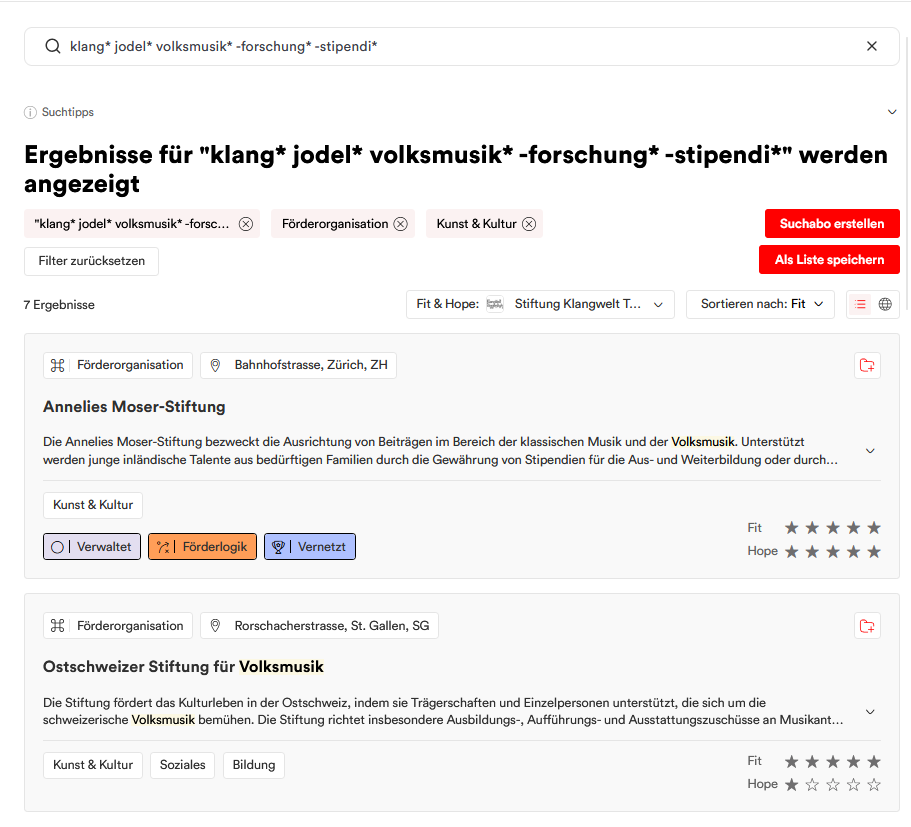
Search More Precisely with Search Operators
You can now combine your search terms in a targeted way. The following operators are available directly in the search field:
- Exclude: -climate research – a minus sign at the beginning excludes results containing this term.
- Exact phrase: ” early childhood” – finds only the exact phrase, which must be enclosed in quotation marks.
- “And” combination: ” Education + Digitalization” – only results that contain all terms connected by a plus sign.
- Or: Education Digitalization – results containing at least one of the terms (how it has worked so far).
- Word stem: Development* – finds all terms with this word stem (e.g., development aid, development cooperation). Use the asterisk to include all possible extensions of a word.
The operators can be combined in any way. A drop-down “Search Tips” section right next to the search field summarizes them at any time.
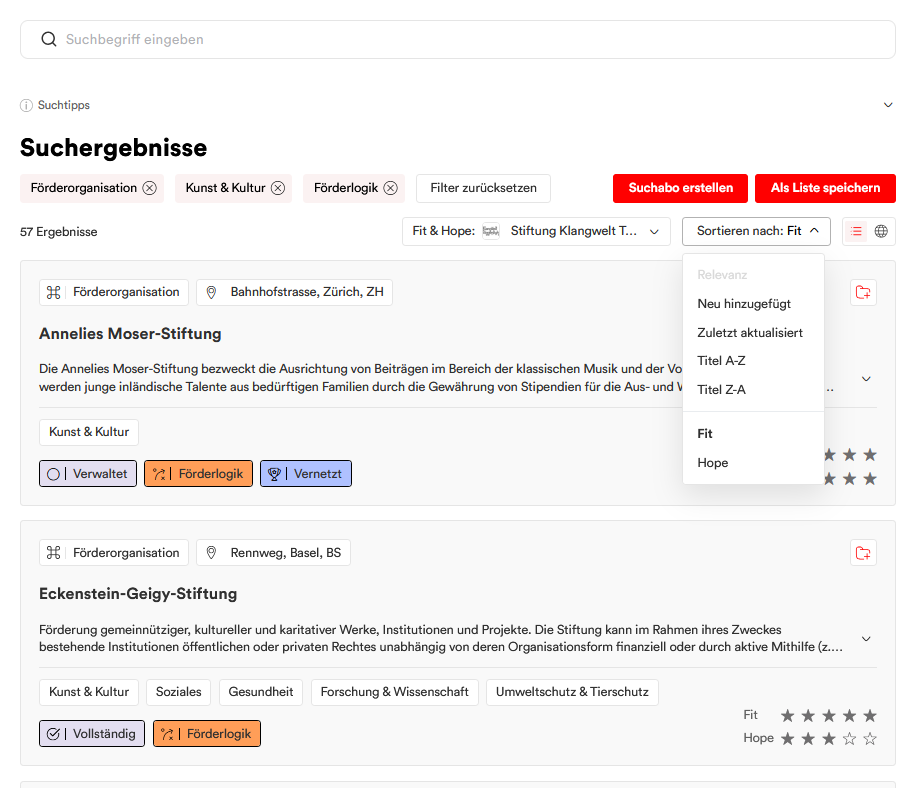
Sort by relevance: Fit & Hope
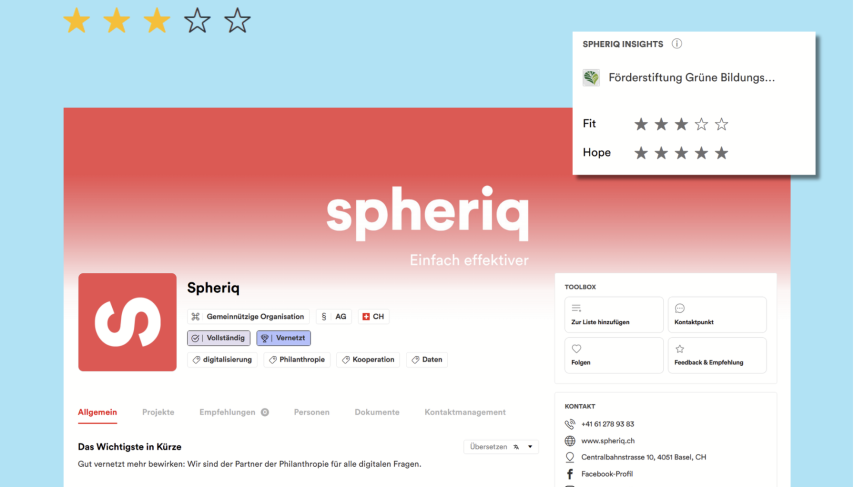
Once the results are in, the sorting options will become more diverse—and more precise. That’s because relevance is now even more closely tied to your organization or project, thanks to the integration of Fit & Hope into the sorting process. This feature is available starting with the Pro plan.
First, use the selector to choose the reference to which Fit & Hope should apply: you can select an organization or a project from your account. You can then sort the search results directly by these Fit & Hope values, either by “Fit” or by “Hope”; so the results that best match your selection will move to the top. The values also appear as star ratings on the result cards. This feature is available to Pro and Partner-level customers.
Find, Instead of Search
With the revamped search feature, we recommend the following approach for a particularly targeted search:
- Enrich your organization and project profiles as much as possible. Pay particular attention to providing precise details on subject areas, fields of activity, and target groups.
- Use a combination of filters and search terms to ensure you receive a maximum of 500 search results
- Enable sorting by “Fit & Hope”
- Go through the results from top to bottom, add suitable organizations to a list, or note your findings in your contact management system
Want to learn more? In the “Introduction to Research” webinar, we’ll show you in practice how to conduct an effective search.
Filter More Precisely
Two new filters also help narrow down the results:
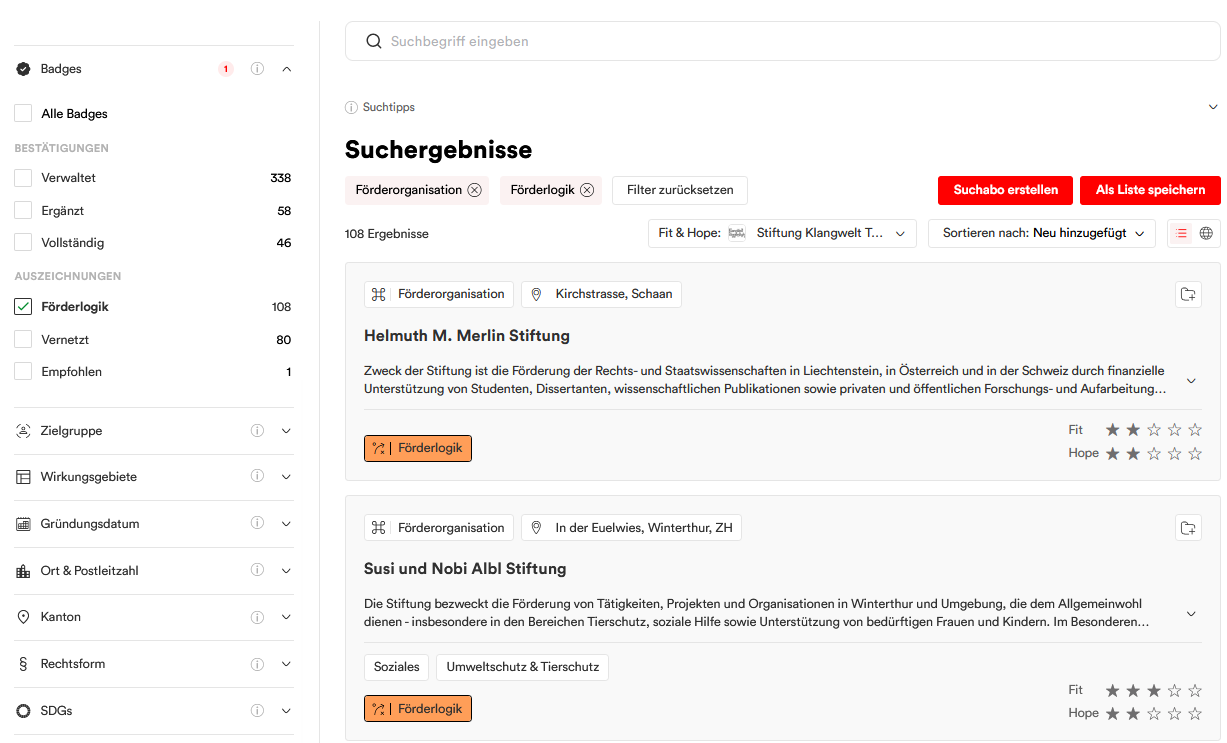
The badge filter limits the search to an organization’s badges. Badges are digital insignias that indicate how complete, verified, and active a profile is. The filter is divided into four categories:
- Verifications (Managed, Updated, Complete) – how complete and verified a profile is
- Tax Exemption (Tax-Exempt) – Confirmed Cantonal Tax Exemption
- Awards (Connected, Funding Logic, Recommended) – Activity, Transparency, and Networking on the Platform
- Funding Logic (Funding Logic) – Stored and Verified Funding Logic
For example, you can filter the results to show only actively managed or tax-exempt organizations. You can find more information about the badges in the detailed article.
The new project status filter displays only projects with the status “In Progress,” “Completed,” or “Scouting” when searching for projects. This allows funding organizations in particular to narrow down their search—for example, to only ongoing projects or exclusively to scouting projects, which are visible only to funding organizations.
With the Deep Shape release, we’ve also thoroughly revamped the “Area of Operation” filter. Instead of clicking through a nested tree structure as before, you can now simply type in the location you’re looking for, and the filter will suggest matching regions and countries (for example, “Canton of Zurich · Switzerland · Europe”). Only regions to which organizations are actually assigned are suggested. By the way: foreign-language entries (e.g., “Caribbean”) are also recognized. If you prefer to browse, you can continue to use the familiar tree view.
Continue working right away
You can now view more information in the results without opening a profile. The search results overview has been enhanced with additional information: Organization badges and Fit & Hope scores are now visible directly in the results without having to open a profile. For projects, the status is also displayed on the map.
You can now save your search results in their entirety. With “Save as List,” you can save all displayed search results as a private list with a single click (up to 500 results, starting at the Starter level). You can now also create a list directly from an existing search subscription—with up to 500 entries instead of the previous maximum of 300.
Here’s how it works in practice
Suppose you’re looking for foundations in the field of environmental education but want to exclude pure climate research. Using the new operators, enter the following in the search field: environmental education -climate research. Use the badge filter to limit your search to actively managed organizations, and sorting by Fit & Hope brings the foundations best suited to your organization to the top. You can see badges and Fit & Hope scores directly in the results list—you don’t have to open a single profile to narrow down your selection. You can then save the most promising results as a list with a single click.
Why this is important to us
Your search shouldn’t be hindered by the tool or by data privacy concerns. The faster and more precisely you find the right funding partners, the more time you’ll have for what really matters: making contact, submitting a grant application, and building relationships. The new search feature lays the foundation for this, and we’re continuously expanding it.
At a Glance
New search platform —faster, more relevant, and more privacy-friendly—without external third-party providers
Search operators: exclude (-), exact phrase (“…”), And (“A + B”), Or (space), word stem (term*)
New filters: Badge filters (certifications, tax exemption, awards, funding criteria) and project status filters (In Progress / Completed / Scouting)
Sorting by Fit & Hope with values displayed on the result cards (Pro and Partner)
Badges and project status displayed directly on the results cards; Fit & Hope shown as stars when sorting is active (Pro/Partner)
Savesearch results and search subscriptions as a list (up to 500 instead of the previous 300)