

Deep Shape doesn’t just introduce new features. With this release, we’ve also streamlined Spheriq in various areas: features have been consolidated, workflows simplified, and previously beta features incorporated into the standard scope of services. This makes the platform easier to navigate—and ensures you can get where you need to go faster.
In our first post about the Deep Shape release, we highlighted the most important new features—from the improved search function to the new profile toolbox and enhanced contact and request management.
But a major release also involves the other side of the coin: existing features are simplified, reorganized, or replaced with better solutions. In this post, we’ll show you what’s changing with Deep Shape—and how you can try out the new features.
Improved Hope
With Deep Shape, the Hope score also becomes more accurate. It is now calculated independently of the fit and takes into account more indicators of how realistic and promising it might be to reach out to a funding organization.
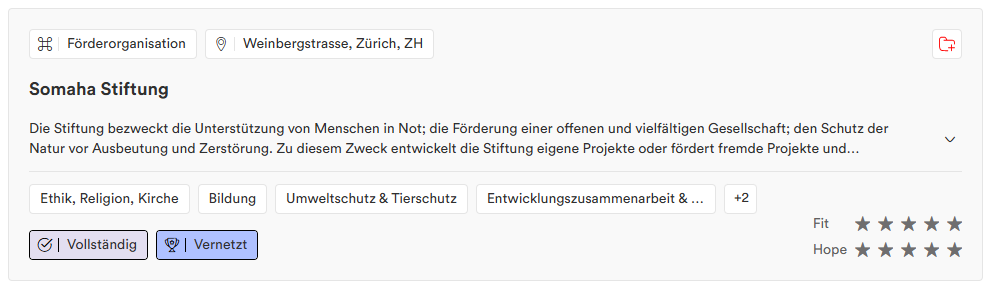
Factors included in the calculation include current activity, documented funding, clear application processes, recommendations, community feedback, and the quality and recency of the profile. This results in a more nuanced rating on a scale of 0 to 5 stars. For more information, see the detailed article.
Smart Lists for Contact Management
The new Smart Lists neatly consolidate the “fruits” of your contact management efforts. They thus form the basis of your CRM on Spheriq —with one key difference: You don’t have to enter about 90 percent of the information yourself. Instead, the Smart Lists draw directly from the existing Spheriq data and your contact and funding relationships. Your supplementary data (contact persons, notes, manual ratings, or funding applications) is protected and visible only to you.
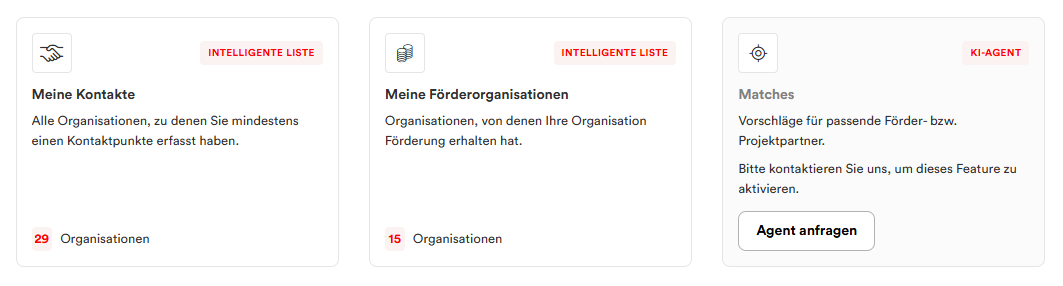
Two Smart Lists are available from the start: “All Contacts ,” which includes all organizations with which there are contact points, and—depending on the organization type—“All Funding Organizations” or “All Recipients,” which are subsets of “All Contacts” consisting exclusively of confirmed funding relationships. The lists update automatically from the contact management system and can be used directly for research and further work. Next week, we’ll show you exactly how Smart Lists work and how to use them most effectively in a dedicated in-depth article.
An Easier Way to Find the Right Area of Effect
The filter for areas of operation will become much simpler. Instead of clicking through multiple levels of a tree structure, you’ll now be able to find and select regions directly using a search field . The suggestions show the geographic context—such as “Canton of Zurich · Switzerland · Europe”—and only those areas of operation to which organizations are actually assigned are displayed.
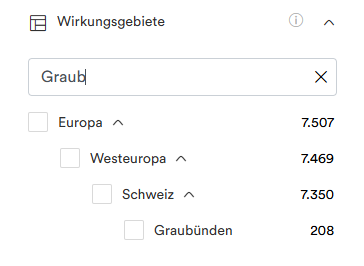
This makes searching faster, more precise, and significantly more convenient—especially on mobile devices. Only the options you actively click on are selected; higher-level regions are not automatically added. We’ll show you more about how to use the new filtering options specifically for your grant search in the in-depth article“Finding the Right Foundation—Without a Long Search.”
AI Assistants Become Prompt Launchers
Spheriq AI has evolved significantly over the past few months. Many tasks for which we introduced separate AI assistants a few years ago can now be handled more easily and effectively directly within Spheriq AI. That’s why we’re consolidating these features: Instead of separate assistants, you now have access to appropriate prompt launchers that guide you directly to the respective task:
- Create a project profile from a PDF: Upload the PDF to Spheriq AI and start with the prompt “Create a Spheriq project profile.”
- Create a cover letter for a specific grant application: Upload the grant application or project dossier and enter, for example, “Create a cover letter for the Gebert Rüf Foundation.”
- Improve an existing project profile: The “Review project profile” prompt launcher analyzes the existing profile and highlights areas for improvement.
- Find suitable funding organizations: The previous Magic List is replaced by the “Find Funding Organizations” prompt launcher.
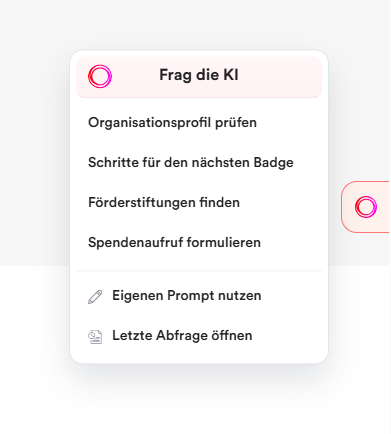
This creates a central entry point to Spheriq AI, rather than a multitude of individual AI tools. Documents, platform data, and the relevant task all come together in one place—and you can continue or refine your request directly as needed.
Spheriq AI’s full results view is available starting at the Pro tier. This means that the AI follows the same logic as other in-depth research and fundraising features on Spheriq: The Starter tier provides a starting point, while the full range of features is available at the Pro tier.
Spheriq Insights is also exiting the beta phase
The same applies to Spheriq Insights in search and on organization profiles. Fit and Hope were deliberately made widely visible during the beta phase so that we could test and further develop these new signals together with our users.
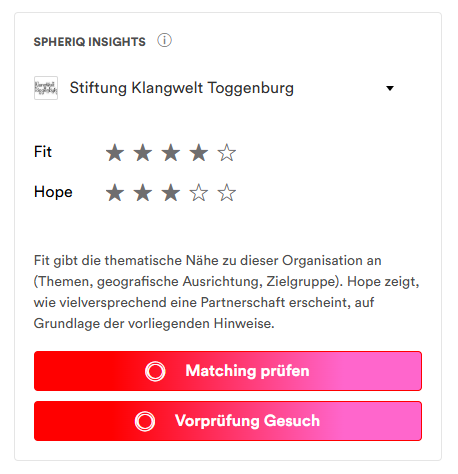
This beta phase is now complete. Fit and Hope will now be displayed starting at the Pro level. This makes the Insights part of Spheriq’s expanded search capabilities, where they can be used alongside search, profile information, lists, and Spheriq AI for in-depth research.
Update on Badges
Badges will play an even more important role on Spheriq in the future—including as filters in the search function (see the article “Finding the Right Foundation—Without a Long Search”). That’s why we’ve simplified the structure and made the distinctions clearer. The completeness badges retain their hierarchical structure: “Managed,” “Supplemented,” and “Complete.” Only the highest level achieved is displayed on each profile.
Award badges form their own category. All awards earned are displayed simultaneously. These include, among others, “Funding Logic,” “Networked,” and, new this time, “Recommended.”
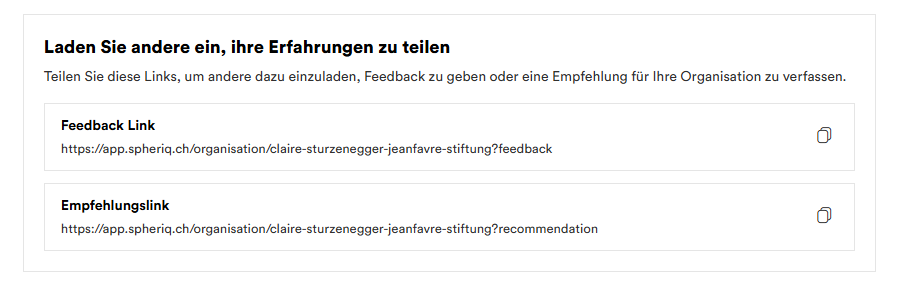
An organization receives the new “Recommended” badge when it has at least one verified recommendation. You can now directly request recommendations for your organization from potential recommenders through the platform.
The previous badges—“Committed,” “Champion,” “Transparent,” and “Approved”—will be discontinued. This will make the badge system clearer and, at the same time, more useful for research.
Recommendation: The Power of “
” With the new “Recommended” badge, the secret currency of the nonprofit sector becomes even more visible on Spheriq. Here’s how to earn the badge:
1. Ask an organization you’ve successfully worked with in the past to write a recommendation for you. The easiest way to do this is to use the recommendation link directly. For data quality reasons, the person providing the recommendation must verify their identity beforehand.
2. Need some ideas on what makes a good recommendation? Read our tips and background information on recommendations.
3. Once the recommendation has been written, it is reviewed by the data team. If the review is successful, the recommendation will be displayed on your profile and the badge will appear automatically
4. We include new recommendations in the Spheriq Update every week—this helps over 20,000 recipients see where their strengths lie.
Try Pro for free for one month
Are you a nonprofit using Spheriq on the Free plan and would like to try out Spheriq AI, Fit & Hope, and the other Pro features for yourself? If so, you can upgrade to the Pro plan for one month free of charge.
To qualify, you must have a complete and published organization profile with the “Complete” badge. The trial subscription can be canceled at any time after the initial 2-week period, during the remainder of the trial month; unless canceled, it automatically converts to a full Pro subscription. Our goal is to give organizations that actively maintain their profile on Spheriq the opportunity to experience the expanded range of features in their day-to-day fundraising activities.
Interested? Send us a quick message.
Get to Know Spheriq in the Quick Tour Webinar
Where can you find the most important features—and how can you use Spheriq AI, Research, and Profiles as efficiently as possible? In our free Quick Tour webinars, we’ll give you a concise, hands-on overview of the platform and answer your questions.
Conclusion
For us, “Deep Shape” doesn’t mean adding as many new features as possible. It’s just as important to simplify what already exists, consolidate similar features, and turn successful test phases into clear, reliable offerings.
With the new prompt launchers, Spheriq AI becomes more accessible; Fit & Hope become part of the regular Pro offering; and the differences between Free and Pro become clearer. And anyone who wants to explore the advanced features first can try them out for free for one month as a nonprofit with a complete profile.
With Deep Shape, Spheriq is not only becoming more powerful—it’s also becoming simpler and more intuitive.